Get In Touch
×
People use Pinterest to plan a purchase before they make it. That is why a product catalog behaves so differently here than on a normal feed.
This page shows what Pinterest has produced for real stores. It also covers the two things that break most often. Those are catalog syncing and attribution.
Yes, if your product is visual and people think before they buy it. Pinterest works because people search it while planning. They are not scrolling to kill time. So the traffic already wants something.
Our published case studies show it. A mattress brand hit 49.17 ROAS on Pinterest Ads. A DTC store tracked $166.6k in revenue back to Pinterest.
In that same store, paid traffic turned add-to-carts into checkouts 20.2% of the time. Organic did it 1.8% of the time.
It does not work for everything. Pinterest rewards things people save and come back to. If you sell a $12 impulse buy, or a local service, spend your money elsewhere.
We will tell you that on the audit. We would rather lose the sale than take it.
Every number links to the case study and the screenshot it came from.
The cost side of the same accounts: real CPC, CPM and ROAS from four Pinterest ad accounts.
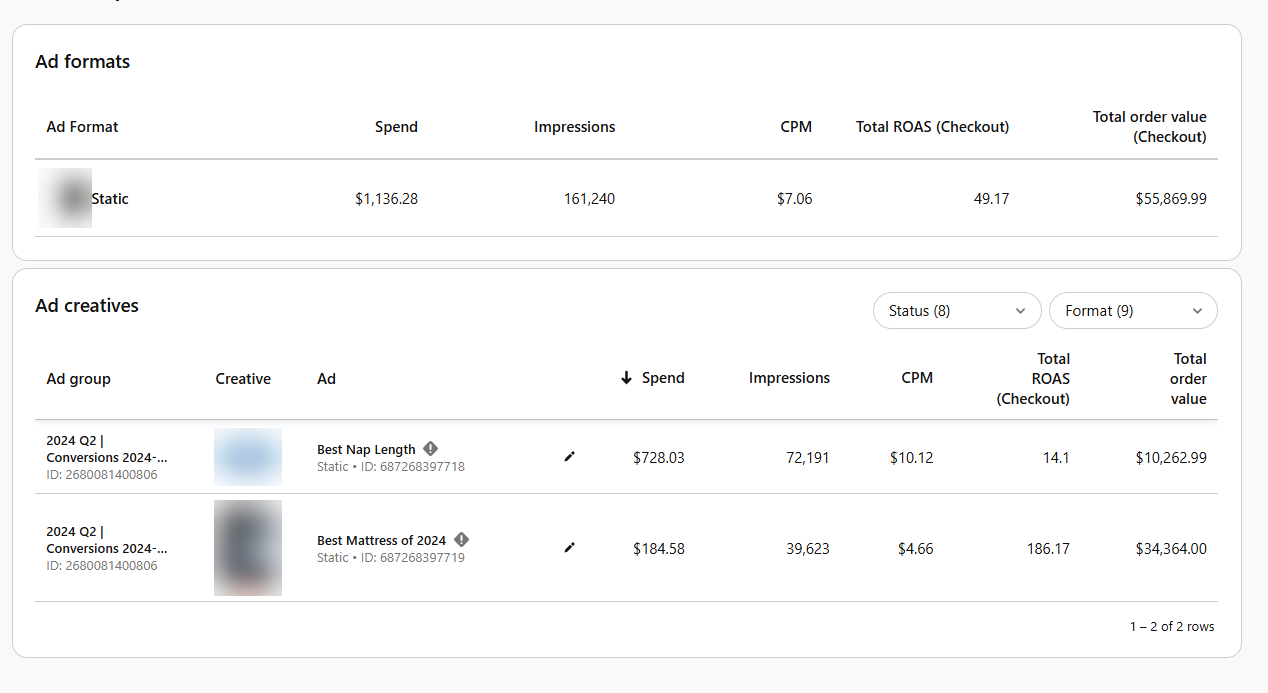
Ad formats from the mattress account. $1,136.28 of spend returned $55,869.99 in order value at 49.17 ROAS.
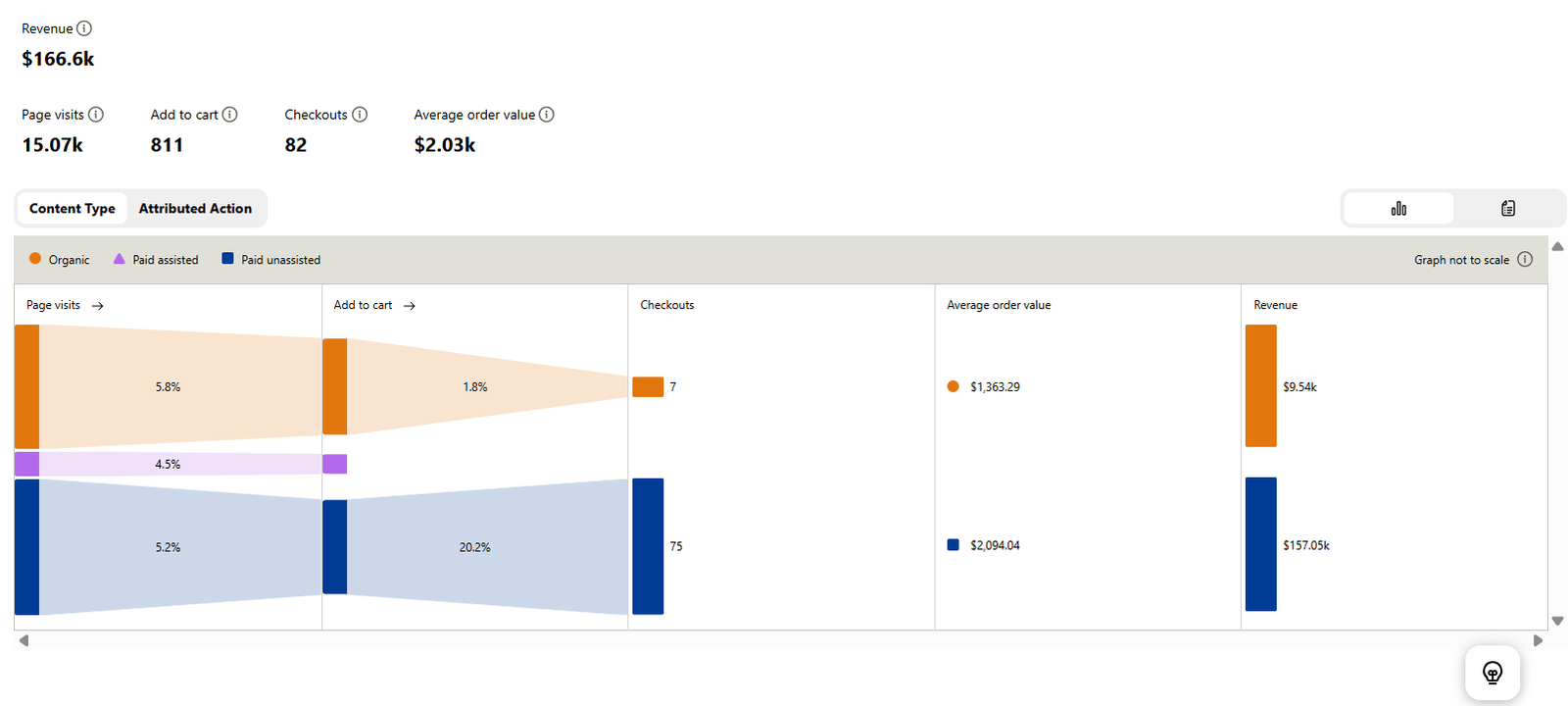
Conversion insights from the DTC store. 15,070 visits, then 811 add-to-carts, then 82 checkouts. $166.6k tracked in total.
Client names withheld under NDA. We will walk you through the accounts on a call.
The audience is big and still growing. Pinterest hit a record 640 million monthly users in the quarter ending June 30, 2026. That is up 11% on last year.
Revenue was $1.18 billion, up 18%. Those figures come from Pinterest's own Q2 2026 results. This is not a shrinking app your rivals already own.
Planning beats interrupting. Someone searching "bedroom styling ideas" is halfway to a decision. The same person on a social feed is not shopping at all.
That is why the same image can perform so differently on the two platforms.
Cheap clicks, real order values. Across our published accounts, a click has cost between $0.24 and £0.07.
If your average order is $200, $500 or $2,000, that gap is the whole business case. A few checkouts can pay for months of traffic.
Saves keep working. Posts do not. Every save puts your product on someone else's board, in front of a new audience.
One account we run has picked up 96.02k saves. Those keep sending traffic long after the pin went out. Nothing on a normal feed does that.
You can see the season coming. People plan weeks ahead on Pinterest. So you can book seasonal campaigns against demand you can already see.
This is not a ranking. Each one does a different job. Most stores that grow end up running two of them.
| Meta (Facebook/Instagram) | Google Shopping | ||
|---|---|---|---|
| What the user is doing | Planning a purchase | Browsing for fun | Searching to buy now |
| Demand it serves | Demand that is forming | Creates new demand | Catches demand today |
| How long content lasts | Months. Saves keep sharing it. | Hours to days | As long as you bid |
| Typical click cost | Low. Our accounts have run $0.24 and £0.07. | Higher in most retail | Highest, and it climbs |
| Best for | Visual products people think about | Impulse buys and launches | Brand and product name searches |
| Works without spend | Yes. Organic pins keep going. | Barely | No |
The Pinterest click costs come from our own published case studies, linked above. The Meta and Google columns describe how those channels behave. They are not benchmark rates. Real costs move a lot by niche and season.
Ads give you readable data within days. Organic takes about 90 days to show its real shape.
So we suggest planning for three months. The packages are still month to month. There is nothing to sign.
Pinterest Ads give you readable conversion data within days. One 7 day window in the DTC account returned $4.23k in order value on $35.88 of spend. That receipt is on the packages page.
Organic is slower and builds up. It usually takes about 90 days to show its real shape. Pins collect saves, and saves keep sending them out again.
That gap explains most of the "Pinterest didn't work for us" stories. It is a timing problem, not a channel problem.
Judge organic at week four and you are reading a curve before it starts. Judge ads at week four and you have enough to decide.
A realistic order: tracking checked in week one. First pins live in week two. Campaigns live once tracking is proven. Readable ad data by day 30. The organic curve bending around day 90.
You can see that shape in the travel blog case study. The build up only becomes obvious well past month one.
We hear this on most first calls. Almost every time, the product was fine. It was one of four things.
Tracking was never right. The tag fires, but the checkout event does not. So every sale Pinterest drove got credited somewhere else.
On paper the account looks dead. It was working the whole time.
The objective was wrong. A traffic or awareness campaign buys cheap clicks, not buyers. The reports look great. The money never shows up.
It was judged too early. Organic got cancelled at week six. The curve had not started yet.
Or the product is a poor fit. Cheap impulse items with thin margins. Services with nothing to look at.
That is a real answer too. If it is yours, the free audit will say so instead of selling you a package.
Most of the work is the same on both. Only the plumbing changes.
Catalog sync. Your product feed connects to Pinterest. Your whole inventory becomes shoppable, and the product data stays current on its own.
Shopping and collection ads. These pull from that catalog. You do not build a creative for every single product. Pinterest matches products to what people want.
Rich pins. Live price and stock get pulled from your store onto every organic pin. Shoppers see the real price before they click, so the clicks you pay for are better.
Conversion tracking, done properly. The Pinterest tag goes in with every event. Page visit, add-to-cart, checkout. We test it before a penny goes live.
This is the step that makes your reports add up. It is also the step most people skip.
How to connect Shopify or WooCommerce is documented everywhere. What nobody documents is why a connected feed still pulls in only part of your catalog.
Here are the five we see most, roughly in order.
1. The domain is not claimed. Products can sync while your site is still unclaimed. Then tracking and rich pins quietly fail. Most stores miss this one.
2. Some variants are missing fields. A product needs an id, title, description, link, image link, price and stock status.
If one variant has no price, only that variant drops. The catalog looks fine at a glance and is quietly incomplete.
3. Product IDs keep changing. If your IDs regenerate on update, Pinterest reads them as brand new products. The learning starts over.
4. Image URLs will not load publicly. Anything behind a redirect, a CDN rule or a login fails. The image still looks perfect in your browser, which is what makes this one confusing.
5. Out of stock items drop out. Stock changes pull items from the feed. It looks like a sync failure. It is the feed doing its job.
The fix is the same every time. Read the sync report, not the product count. Treat the first sync as a test, not a finish line.
Store owners say a version of this to us all the time. "My Pinterest ads are getting clicks but I don't see them in Shopify."
The tag is fine. The numbers still do not match. That is normal, not a broken account. Reading it wrong is how people switch off campaigns that are working.
The two tools count different things. Pinterest reports sales inside a conversion window you can set. It also credits actions that GA4 throws away.
In our own client accounts we have seen windows set to 30/30/30 and to 60/60/7. A sale two weeks after someone saved a pin counts for Pinterest. It does not count for GA4.
Untagged links land in the wrong bucket. With no UTM tags, Pinterest traffic shows up in GA4 as direct or referral. The sale happened. The credit went elsewhere.
People switch devices. Pinterest users are usually logged in. So a pin saved on a phone and bought on a laptop is one person to Pinterest. To GA4 it is two visits.
What to do. Stop waiting for the numbers to match. Pick one to make decisions with.
We report both, name the window on every figure, and check them against your own order data. That is the only number that pays you.
It is also why every case study on this site names its window instead of quoting a bare multiple.
The most useful number we have published for stores is this one. In the DTC account, paid traffic turned add-to-carts into checkouts 20.2% of the time. Organic managed 1.8%.
That is about eleven times the rate. It is not a reason to drop organic. It is the reverse.
Organic built the warm audience that paid then closed. It also helped another 4.5% of the traffic that converted.
Run ads alone and you pay full price for cold audiences. Run organic alone and you leave the checkout rate on the table.
So we run both as one funnel. Pinterest SEO builds the warm layer. Pinterest Ads convert it.
That is the Full-Service package. It is what the $166.6k account runs.
We run Pinterest accounts for stores in the United States, the United Kingdom and the UAE. We bill in USD.
The same people who produced the dashboards on this page run your account. Nobody hands it to a junior after the sales call. Page last checked August 2026.
They count different things and always will. Pinterest credits sales inside a window you can set. It also counts actions that GA4 throws away.
Links with no UTM tags land in GA4 as direct or referral. And a pin saved on a phone then bought on a laptop is one person to Pinterest. To GA4 it is two visits.
Waj Digital reports both, names the window on every figure, and checks them against your own order data.
It is usually one of five things. The domain is not claimed. Some variants are missing a required field such as price or stock. Product IDs keep changing, so Pinterest reads them as new products.
Image URLs will not load publicly. Or out of stock items are being dropped correctly.
Read the sync report rather than the product count.
Yes, for visual products people think about before buying. Pinterest users search while they are planning, so the traffic already wants something.
Our published case studies include a mattress DTC brand at 49.17 ROAS. Another is a DTC store with $166.6k in revenue tracked to Pinterest across 82 checkouts.
Yes. Both platforms can send a product feed to Pinterest. That makes your whole catalog shoppable. It also powers shopping ads and rich pins with live pricing.
Waj Digital sets up the catalog link, installs the tag, and tests the events before anything goes live.
There is no minimum. Two published campaign windows ran on $20.58 and $35.88 in total spend, and both returned four figures in order value.
If you are starting out, $10 to $20 a day is enough to gather a signal. Budget then follows results.
They do different jobs. Meta stops people mid-scroll and creates demand. Pinterest catches demand that is already forming, because people are planning.
For visual products that people think about, Pinterest often gives cheaper clicks. The two work well together rather than as swaps.
Pinterest Ads produce conversion data within days. One published 7 day window returned $4.23k in order value on $35.88 of spend.
Organic builds over weeks. It usually shows its real shape around day 90, because saved pins keep going out again.
Waj Digital's Pinterest packages run from $500 to $1,500 a month. Organic growth starts at $500. Ads management starts at $950. Full service is $1,500. All are month to month with no contract, and you pay ad spend straight to Pinterest.
Free · 48 hours · no call
Pinterest is a search engine. Your buyers type words into it every day. Some brands show up. Most do not.
If the gap is small, we will say so. You do not need us then.
Two boxes. No call booked.
Free. Five a week. No card, no call.
The free audit looks at your store on Pinterest and tells you honestly whether the numbers work. It also tells you what it would cost.
You can also see the full Pinterest marketing agency service, or read every published case study first.